Ember Plugins
Ember Shop
A server shop that is configured in game and sells anything.
What makes it different
It sells items, not item names. Every listing stores a whole Bukkit
ItemStack - custom model data, NBT, persistent data and all. That single
decision is why it works with ItemsAdder, Oraxen, Nexo, MMOItems,
HeadDatabase, or an item plugin that does not exist yet: the shop never looks
inside the item, so there is nothing to teach it about a new one.
Nothing needs a config file. Categories, items, prices, permissions,
stock and icons are all edited from /shop admin. shops.yml exists and you
are welcome to read it, but you never have to open it.
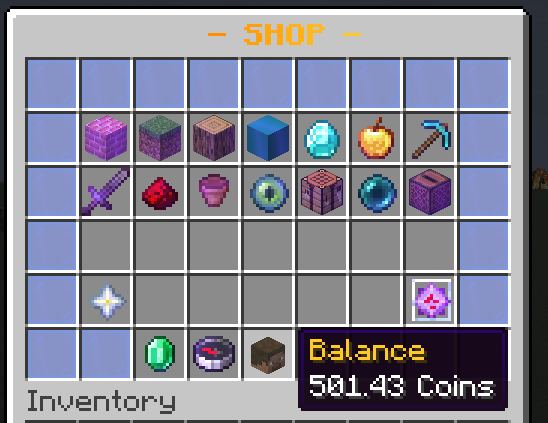
It generates its own catalogue. On first run it builds a full vanilla shop - over a thousand items across sixteen sections - priced on one coherent scale. Materials are looked up by name and skipped when your server does not have them, so the same jar produces a clean catalogue on any Minecraft version.
Installing
- Drop
EmberShop.jarintoplugins/. - Make sure an economy is available: Vault with any provider, or Ember Coins.
- Start the server.
On first start you will see:
[EmberShop] Generated the default shop: 1022 item(s) across 16 sections, selling back at 25%.
[EmberShop] Economy: Ember Coins
That is a working shop. Everything after this point is tuning.
The first five minutes
To add your own item: /shop admin → pick a category → Add held item →
set a price. To add a lot at once, use Drag and drop and drop a shulker
box worth of items into the window.
Next
- Using the shop - what players see
- Configuring in game - the editor
- Items from other plugins - references like
hdb:1234 - Pricing - dynamic prices, rank discounts, stock
- Legendary gear - the sixteen built-in items
- Commands and permissions
License
All Rights Reserved / No License
Ember Shop is proprietary software, © 2023-2026 TheMeanOneDevelopments. No license is granted.
Obtaining a copy lets you run it on servers you operate. It may not be redistributed, resold, shared, published, decompiled, reverse engineered or modified without written permission.
The configuration and menu files you create are yours. Nothing here claims any ownership over them.
Listing image
A single tall image with everything on this page, for store listings: ember-shop-listing.jpg. It is regenerated whenever features change, so the link stays the same.