Ember Plugins
Ember Horizon
Trades a little draw distance for the TPS you actually need, and shows you where the tick time went.
Why this does not unload chunks
Plugins in this space usually loop over loaded chunks and call unloadChunk
on the ones far from players. That was this plugin's predecessor too, and it
is the wrong lever on any modern server.
Paper already unloads chunks nothing wants, through its own ticket system. Asking it to unload a chunk something still holds is ignored; where the call does land, the chunk reloads moments later. You pay for the churn and keep none of the memory. We measured it: 3,600 force-loaded empty chunks moved TPS by almost nothing. Chunks with nothing in them are close to free.
What costs a server is how many chunks are ticked, and what is standing in them. So Ember Horizon adjusts that instead, and tells you where the expensive chunks are.
What it does
Adapts distance to load. Every thirty seconds it compares TPS to two thresholds. Below the lower one it steps distances down; above the upper one it steps them back up. One step per cycle, so nobody gets snapped from 10 to 4 — under real load a player sees the horizon drift in a chunk at a time, if they notice at all.
Drops simulation distance first. Ticking a chunk costs far more than sending one, and players notice the view closing in long before they notice distant mobs pausing. Recovery runs the other way: view distance comes back first. That ordering is most of the quality-of-life difference.
Protects your ranks. A permission can set a floor, so the players paying you are not the first ones squeezed:
emberhorizon.view.10          never below 10 view distance
emberhorizon.simulation.6     never below 6 simulation distance
The highest node a player holds wins, still capped by max in the config.
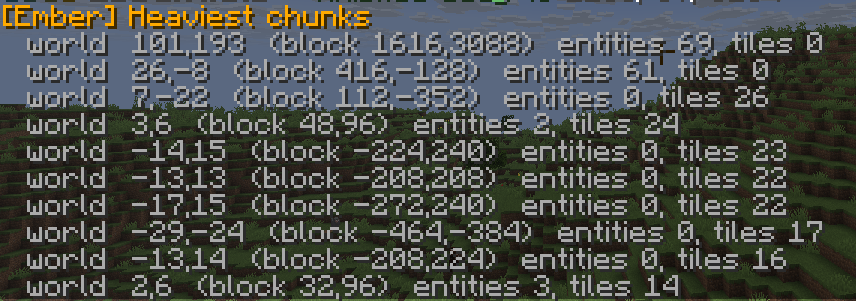
Finds what is actually heavy. /horizon hotspots ranks loaded chunks by
what is standing in them, with block coordinates so you can go and look. Tile
entities count double, because a hopper ticks every tick whether or not
anyone is nearby.
Shows what is holding chunks open. /horizon tickets lists every plugin
holding chunk tickets, and every force-loaded chunk. Force-loads live in
level.dat and survive restarts forever — they are the usual answer to "why
is this server eating memory". /horizon sweep clears them, dry-run first.
On older versions
One jar covers 1.16.5 through 26.2, and it tells you what it can and cannot do rather than pretending:
| Server | What you get |
|---|---|
| Paper 1.18+ | View and simulation distance, per player |
| Paper 1.16 – 1.17 | View distance only — simulation distance did not exist yet |
| Spigot | Distances applied per world; there is no per-player API |
/horizon status states which mode it is in. On 1.16 it says
simulation: n/a (needs 1.18+) instead of quietly doing nothing.
In pictures
Real output, on a live server.

Commands and permissions
All of it sits behind emberhorizon.admin (default: op).
| Command | What it does |
|---|---|
/horizon status |
TPS, current distances, why they last changed, chunk and entity totals |
/horizon hotspots [n] |
The heaviest loaded chunks, with coordinates |
/horizon players |
The distance actually applied to each player right now |
/horizon tickets |
Plugin chunk tickets and force-loaded chunks |
/horizon sweep [confirm] |
Clears force-loaded chunks. Dry run without confirm |
/horizon reload |
Re-reads the config, including the interval |
Aliases: /emberhorizon, /eh.
Settling it in
Start with dynamic.enabled: false. You get every diagnostic and no change
to what players see. Run /horizon status at your busiest hour: if TPS sits
at 20, you do not need the scaling and this stays a diagnostic tool. If it is
dipping under 18, turn it on and it will start earning its place.
Network requests
Two, both optional and both off with one line:
- bStats (
metrics: true) — anonymous usage statistics, plugin id 27424. - Update check (
update-check: true) — one request at startup to see whether a newer version exists. Nothing about your server is sent, and it never downloads or installs anything. It prints a line.
Media and links
For store posts and reference:
- Listing poster: https://docs.emberplugins.online/media/horizon/ember-horizon-listing.jpg
- Icon: https://docs.emberplugins.online/media/horizon/ember-horizon-icon.png
- Screenshots: heaviest chunks · force-load sweep
- Full media and listing index: Store listings and media