Selling

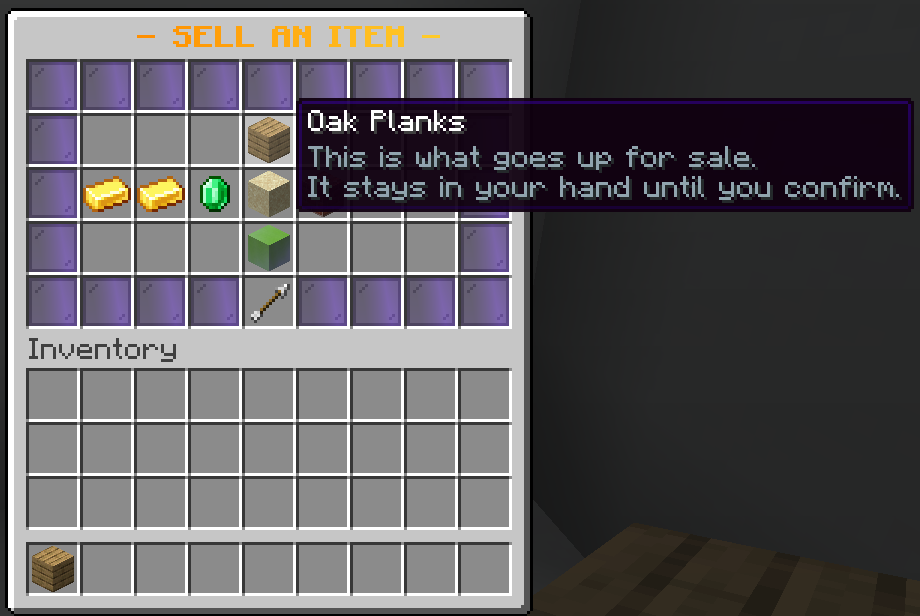
Hold the item and run /ah sell, or press Sell an item in the hall.
The window decides everything before anything is committed: price, currency, buy-it-now or auction, and how long it runs. The item stays in your hand until you press List, so closing the window, disconnecting or a restart mid-decision cannot lose it.
Prices
Type them how you would say them. 500, 1.5k, 2m and 1.2b all work,
and so does 1,500. The window shows the per-item price for a stack, and what
you actually receive after tax.
Tax and fees
Tax is a percentage of the sale that disappears. That is the point: it is the sink that stops a player-run economy inflating. It is set per currency, so cash can be taxed at 5% and an event token at nothing.
A listing fee is charged up front, win or lose, and is flat, a percentage, or both. Zero by default. A small one stops the market filling with hopeful junk.
Ranks can pay less with emberauctions.tax.<percent> - the lowest node a
player holds wins, so emberauctions.tax.0 is tax-free.
Limits
listings.default-limit is how many a player may have up at once, raised per
rank with emberauctions.listings.<n> or removed with
emberauctions.listings.unlimited.
What cannot be sold
blacklist refuses items by material, name or lore, with * as a wildcard,
and looks inside shulker boxes. A box of spawners is not a box, and every
auction plugin that only checks the outer item has been laundering banned
items through shulkers for years.
When nobody buys it
The listing expires back to the seller's collection box. Nothing is ever destroyed.
Which category it lands in
Every listing is filed on a shelf when it is created, and the answer is stored on the listing rather than worked out again on every menu draw. Filing is by material pattern and item tag rather than a hand-written list, so a category written today still catches blocks added to the game next year.
The seller can override it. The sell window has a Category button showing where the item would go on its own; clicking it opens the list, with Automatic at the top and every configured shelf below.
Automatic is the default and is right nearly always. The override exists for the times it is not: an item from another plugin whose material says nothing useful, a renamed block being sold as decoration, a spawn egg meant for the mobs shelf rather than the miscellaneous one.
Whatever the seller picks is written onto the listing at list time exactly as the automatic answer would have been, so browsing, search and the shared market cannot tell the two apart. A category id that no longer exists in the config falls back to automatic rather than filing the listing onto a shelf nobody can open.
Turn the picker off with listings.seller-picks-category: false and everything
is filed automatically. Both editions have it.