Settings
Everything can be edited in game.
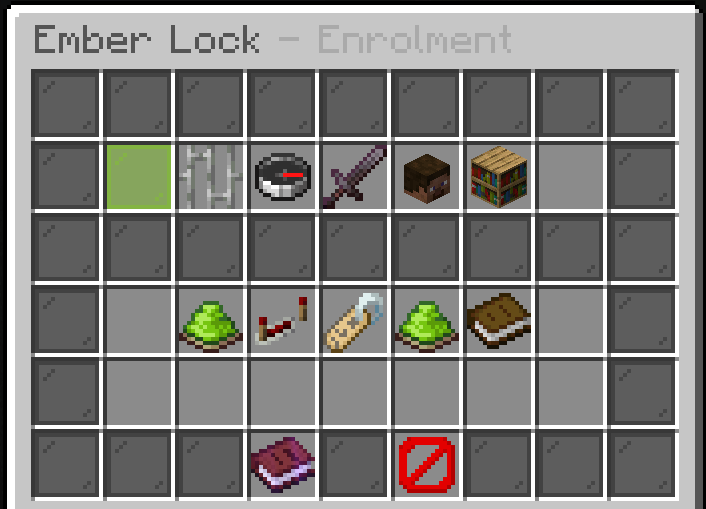
Six tabs: Storage, TOTP, PIN, Attempts, Devices and Step-up. Changes save immediately and apply live, with no restart and no reload command.
The file underneath is config.yml, if you would rather edit it directly. Run
/lock reload afterwards.
Second factors
totp:
  issuer: "Survival Network"      # the name shown in the player's app
  use-chat-on-java: true          # hand Java players the key in chat

pin:
  enabled: true
  length: 4                       # digits

recovery:
  count: 10                       # single-use codes issued at enrolment
Turn pin.enabled off and everyone must use an authenticator app.
Attempts
attempts:
  max: 5                          # wrong answers before a lockout
  seconds-to-enter: 90            # time to answer a prompt
  lockout-minutes: 15
Remembered devices
devices:
  trust-days: 30                  # 0 challenges on every single join
  require-on-new-ip: true         # re-challenge the moment the address changes
Addresses are stored as a hash, not as text. The server can tell that a device it has seen before has come back; it cannot hand anyone a list of your players' addresses.
The keypad
keypad:
  key-material: PAPER
  zero-material: REDSTONE
  keys: ...
  clear: "head:<texture>"
  cancel: "head:<texture>"
Keys are number heads by default. Each accepts:
| Form | Meaning |
|---|---|
head:<texture> |
A player head from a base64 texture |
forge:<key> |
An item from Ember Forge |
ia:<namespace>:<id> |
An item from ItemsAdder |
MATERIAL |
A plain vanilla material |
so the keypad can match a pack you already ship.
Every key also carries its digit as the stack size, which is why it is readable with no resource pack at all. Zero cannot be a stack size, so it gets its own material.
Commands held during a challenge
Anything not on this list is refused while a player is being challenged.