Ember Plugins
Ember Menus
Build custom menus in game. No YAML, no restart, no config file.
Type /emenus, click a slot, and you are building. There is no YAML step, no
restart, and nothing to learn before you can make something useful.
-
Built by clicking
The canvas is the menu, at its real size, drawn exactly as players will see it. Click a slot to fill it. Press Q for the tools.
-
Built not to break
Nothing version-specific is called directly. The API change that killed other menu plugins on 1.21 went unnoticed here. See compatibility.
-
Glowing borders in two clicks
A sixteen-colour palette, borders, backgrounds, and a glow toggle. No hunting for the right stained glass ID.
-
Eight menus already made
Hub, random teleport, kits, ranks, server selector, profile, vote and rules, installed and working on first start.
-
Any placeholder, anywhere
Every field takes PlaceholderAPI, including material names and conditions, not just display names.
-
Menus from other servers
Browse what other owners have shared and install one with a click. Every command it can run is shown to you first.
The home screen
/emenus opens everything the builder can do.
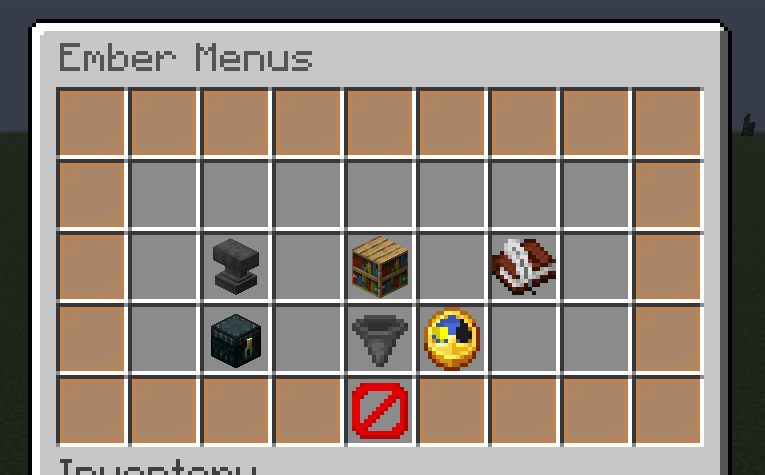
| Create a menu | Names a new menu and drops you straight onto an empty canvas |
| Ready-made menus | The ten menus that ship inside the jar. Install one and it is yours to edit |
| Edit a menu | Every menu on this server, listed. Pick one to open the editor |
| Community menus | Menus other server owners have shared. Every command one can run is shown before anything installs |
| Import menus | Brings menus in from another plugin's folder. Your originals are not touched |
| Reload | Rereads every menu from disk |
Thirty seconds to a working menu
The editor opens on an empty grid.
- Left-click a slot. Holding an item uses that item straight away.
- Give it a display name and a line or two of description.
- Open What clicking does and add an action, for example
[message] &aHelloor[open] warps. - Press Q, then Borders and background, and click a colour.
- Press Q, then Open command, and type
shop. - Save.
Players now open it with /shop. Nothing was edited by hand and the server was
never restarted.
Closing the editor saves
Press Escape and your work is written to disk. Discard changes in the tools screen is the deliberate way to throw it away, and it puts the file back exactly as it was when you opened the editor.
It is still just a file
Every menu is one file in plugins/EmberMenus/menus/, named after the menu.
The builder writes the same file a person would write by hand, sorted top-left
to bottom-right so it reads in the order the menu appears.
menu:
  title: "&8&l| &#ff8f00&lSHOP &8&l|"
  rows: 5
  open_command:
    - shop
  items:
    border:
      material: ORANGE_STAINED_GLASS_PANE
      display_name: " "
      glow: true
      priority: -100
      slots: "0-8, 9, 17, 18, 26, 27, 35, 36-44"
    tools:
      material: IRON_PICKAXE
      slot: 13
      display_name: "&#ff8f00Tools"
      lore:
        - "&7Everything for mining."
      left_click_commands:
        - "[open] shop_tools"
        - "[sound] UI_BUTTON_CLICK"
Edit it by hand whenever you prefer, then run /emenus reload. The promise is
that you never have to open a config file, not that you are stopped from
doing so.
Coming from another menu plugin
Reads the folder, converts what it finds, and writes the results into our own folder. Your original files are not touched. Anything that could not be converted is named in the output rather than dropped quietly.
What you need
| Server | Paper, Purpur or Folia, current release |
| Java | 21 or newer |
| PlaceholderAPI | Not required to run, but you want it |
Install PlaceholderAPI, really
Ember Menus runs perfectly well without it, and most of what makes a menu worth opening does not. A balance, a rank, a kit cooldown, a player count: all of those are placeholders.
Eight of the ten bundled menus use them, and without PlaceholderAPI
those lines render as raw %placeholder% text. The templates fetch the
expansions they need automatically once it is installed.
The kits menu also expects EssentialsX, and the ranks menu expects a permissions plugin such as LuckPerms. Both are optional; the menus install either way and simply leave those parts blank.
Where to go next
| The builder | Every screen and what it does |
| Items and icons | Heads, custom items, model data |
| Actions | Everything a click can do |
| Requirements | Showing different things to different players |
| Ready-made menus | The eight that ship, and what each needs |
| Community menus | Sharing yours, and installing theirs |
| Languages | The seven that ship |
| Compatibility | What has actually been tested |
| Commands and permissions | The reference tables |
License
All Rights Reserved / No License
Ember Menus is proprietary software, © 2023-2026 TheMeanOneDevelopments. No license is granted.
Obtaining a copy lets you run it on servers you operate. It may not be redistributed, resold, shared, published, decompiled, reverse engineered or modified without written permission.
The configuration and menu files you create are yours. Nothing here claims any ownership over them.
Listing image
A single tall image with everything on this page, for store listings: ember-menus-listing.jpg. It is regenerated whenever features changes, so the link stays the same.